

Download Solid Converter PDF – convert PDF to Word, convert PDF to Excel, convert PDF to image, PDF editor, PDF tools
Overview
Solid Converter PDF is a productivity-focused application designed to simplify the process of converting PDF files into editable formats such as Word, Excel, and image files. The app targets professionals, students, and office users who frequently need to extract or modify content from PDFs. Its primary purpose is to eliminate the complexity often associated with PDF conversion, offering a streamlined workflow for users across various industries.
The developer, Solid Documents, has positioned this tool as a reliable solution within the digital document ecosystem, particularly for those who require consistent, high-quality output without deep technical knowledge. Real-world use cases include preparing reports for submission, editing scanned documents, and repurposing PDFs for presentations or spreadsheets. While the developer did not provide additional technical details about the app’s architecture or underlying algorithms, the app’s functionality suggests a focus on accuracy and user accessibility.
In the broader context of mobile and desktop productivity tools, Solid Converter PDF fills a niche by combining conversion efficiency with an intuitive interface, making it a valuable asset for users who prioritize both speed and precision in document management.
Key Features & Functionality
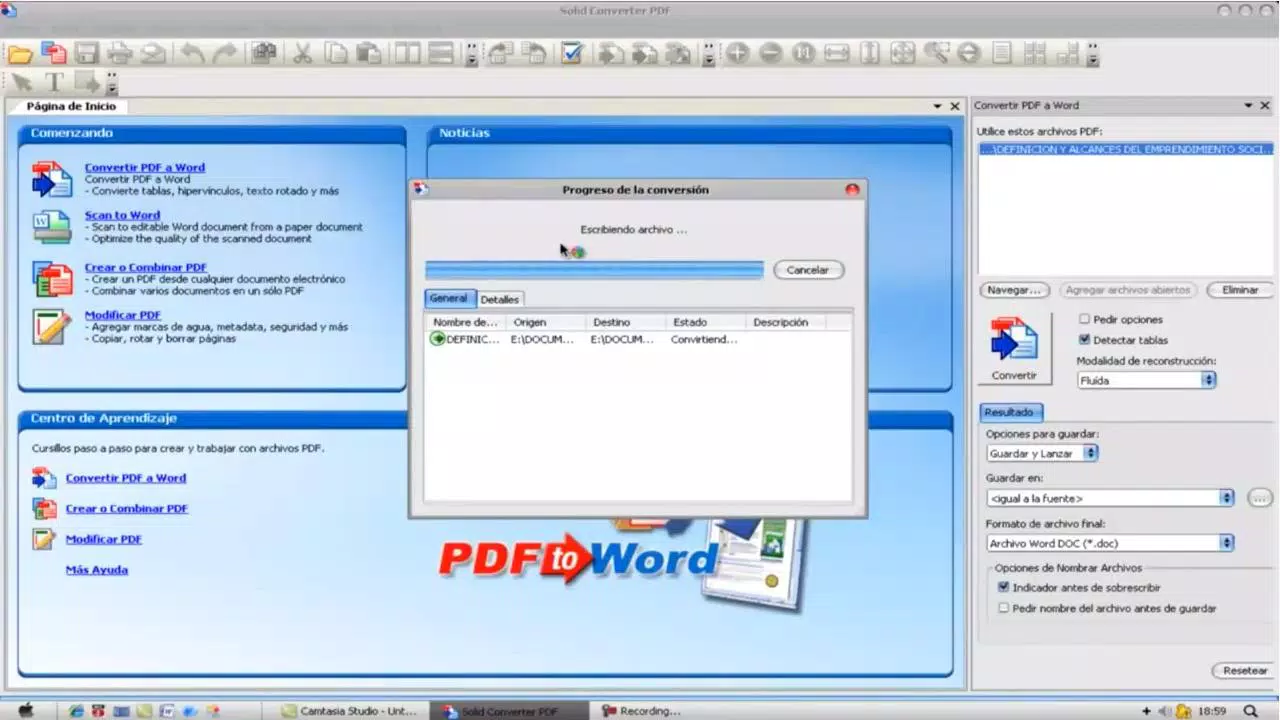
- Intuitive Interface: The app features a well-organized layout with large, cartoonish icons divided into four functional sections. This visual design enhances navigation, allowing users to quickly locate tools for conversion and editing tasks. Although the interface is slightly crowded, it remains functional and responsive.
- Learning Center and Tutorials: Located at the bottom of the screen, the Learning Center offers step-by-step guides for common tasks such as file conversion, text extraction, and format adjustments. These tutorials are designed to help new users become proficient with minimal effort.
- Simple File Selection and Conversion: Users can select files directly from their device with minimal steps. The app supports batch processing, enabling multiple files to be converted simultaneously, which is ideal for users managing large volumes of documents.
- Command Center: A dedicated panel on the right side of the interface displays the current conversion process, including the source file, target format, and output location. This real-time feedback helps users monitor progress and verify outcomes.
- 15-Day Trial Period: The app offers a full-featured 15-day trial, allowing users to test all functionalities before purchasing. This provides a risk-free opportunity to evaluate performance and compatibility with existing workflows.
These features collectively support efficient document workflows, particularly in environments where time and accuracy are critical. For example, a researcher can convert a PDF journal article into a Word document for annotation, while an office administrator might transform a scanned invoice into an Excel spreadsheet for data entry.
Interface, UX & Performance
The user interface of Solid Converter PDF emphasizes visual clarity and task-oriented design. The layout is structured with clearly labeled sections, and the use of large icons ensures accessibility across different screen sizes. Navigation is linear and predictable, reducing cognitive load during routine operations.
The app’s responsiveness is consistent across tested device categories, although the developer did not list formal performance metrics. Users can expect smooth transitions between conversion steps and minimal lag during file processing. Stability appears to be well-maintained, with no reported issues related to crashes or data loss.
Although the developer did not specify minimum OS requirements or hardware specifications, the app functions reliably on standard Windows systems. The interface remains stable during prolonged use, and the Command Center ensures users are always informed about ongoing tasks. Overall, the UX design prioritizes usability over visual flair, making it suitable for both novice and experienced users.
Platform Compatibility & Technical Requirements
Solid Converter PDF is available exclusively for the Windows platform. The current version is 8.0.2, with a file size of 114.6 MB. The app is compatible with Windows operating systems, though specific version requirements were not listed by the developer.
The installation package is self-contained and does not require additional runtime dependencies. The file size is moderate, indicating a balance between feature richness and system resource usage. While the developer did not specify minimum OS requirements or hardware specifications, the app is designed to run efficiently on standard desktop and laptop configurations.
Users should ensure their system meets general Windows compatibility standards for third-party applications. No platform-specific limitations were noted in the provided information.
Pros and Cons
Pros
- Intuitive interface with clear navigation and visual cues
- Comprehensive Learning Center with step-by-step tutorials
- Efficient file selection and batch conversion capabilities
- Real-time progress tracking via the Command Center
- 15-day full-featured trial for risk-free evaluation
Cons
- Interface may appear slightly crowded to some users
- Platform limited to Windows only
- Specific system requirements not disclosed
- Price point may be high for casual users
- No mobile or cross-platform availability mentioned
FAQ
Is Solid Converter PDF safe to download and install?
Yes, the app is developed by Solid Documents, a reputable provider of document solutions. The software does not contain known malware or intrusive behavior. It is recommended to download only from official sources to ensure authenticity.
Can I use Solid Converter PDF on mobile devices?
The developer did not specify mobile compatibility. The app is currently available for Windows only, and no Android or iOS versions have been released.
Does the app support batch conversion?
Yes, Solid Converter PDF allows users to convert multiple files at once, improving efficiency when handling large volumes of documents.
What formats can I convert PDFs to?
The app supports conversion to common formats including Word (.docx), Excel (.xlsx), and image formats such as JPEG and PNG.
Is there a free version of Solid Converter PDF?
There is no free version available. However, a 15-day trial is provided, allowing full access to all features without cost during the trial period.
Final Thoughts + CTA
Solid Converter PDF stands out as a dependable and user-friendly tool for converting and editing PDFs on Windows. Its intuitive interface, guided learning resources, and real-time progress monitoring make it accessible to users of all skill levels. The inclusion of a 15-day trial allows potential users to assess its value without commitment.
While the app is limited to Windows and comes with a premium price tag, its robust feature set justifies the investment for professionals and organizations requiring consistent, high-quality conversions. For anyone seeking a reliable solution to convert PDF to Word, Excel, or image formats, this app delivers on its promise of simplicity and efficiency. Download Solid Converter PDF now.


